Manage Issuing disputes
Last updated: July 29, 2026
If your cardholder notices an unfamiliar transaction on a card you've issued and questions its validity, you can raise a dispute to reclaim the funds from the merchant. For example, when there are concerns about fraud, or the quality or delivery of a purchase.
Information
For acquiring disputes, see Process disputes.
You can raise and manage disputes using the Issuing Disputes API.
Note
To raise and manage Issuing Disputes for Visa cards, use the Cardholder Dispute Form to contact Checkout.com.
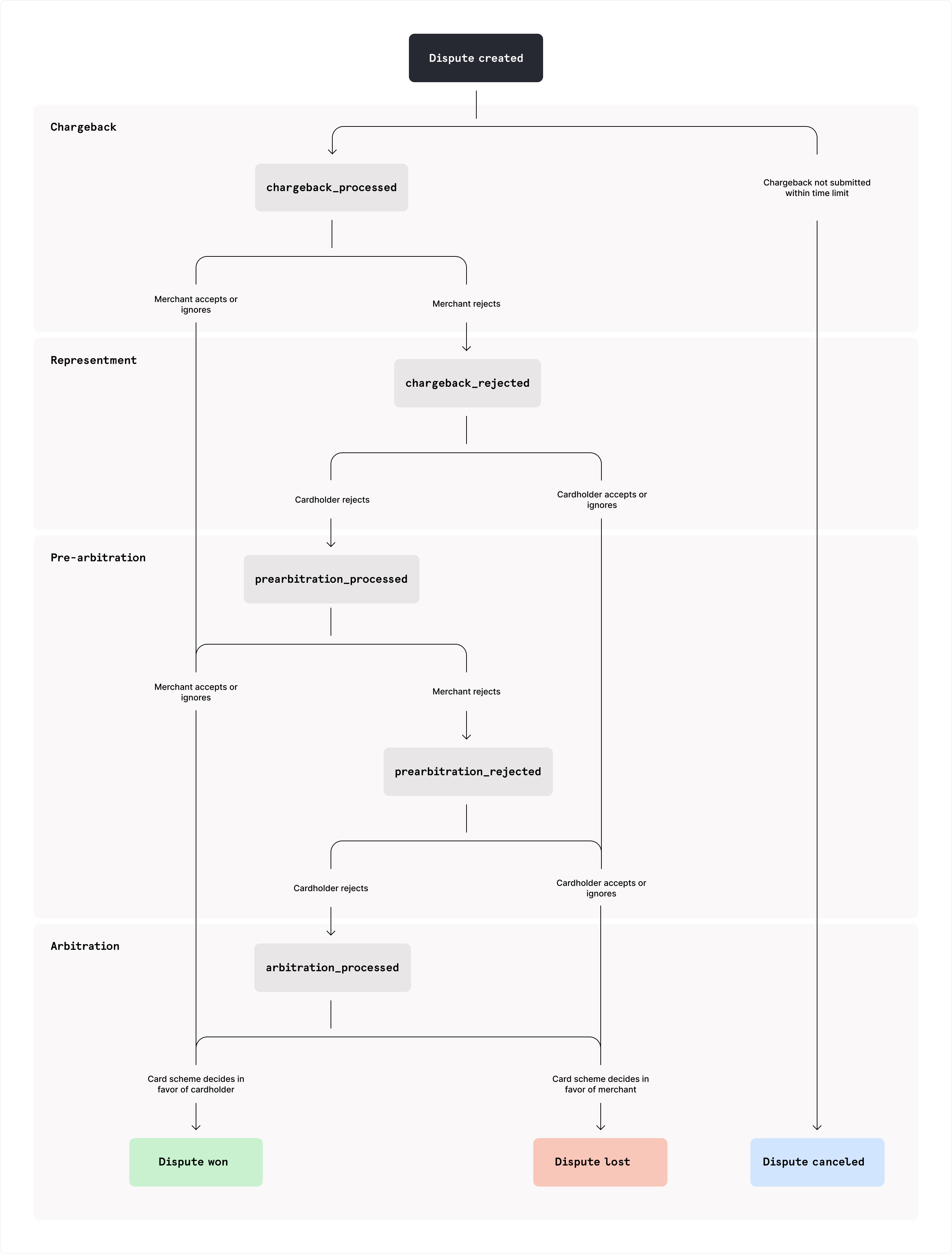
Disputes go through four standard stages in their lifecycle to reach resolution:
- Chargeback:
- You raise a dispute with the card scheme and request a chargeback from the merchant. The funds are returned to the cardholder.
- If the merchant accepts or does not respond to the chargeback, you win the dispute.
- Representment:
- If the merchant rejects the chargeback, they can provide evidence and send a representment. The funds are reversed to the merchant.
- If you accept or do not respond to the representment, the merchant wins the dispute.
- Pre-arbitration:
- If you reject the representment, you can escalate the dispute to pre-arbitration and provide more evidence.
- If the merchant accepts or does not respond to pre-arbitration, you win the dispute and the funds are returned to the cardholder.
- Arbitration:
- If the merchant rejects pre-arbitration, you can escalate to arbitration from the card scheme.
- The scheme's decision is final and the funds go to the winning party.
- Set up an authentication mechanism for your API requests, using OAuth 2.0 or API keys.
- Prepare to handle the Issuing dispute statuses.
- Configure your webhook server and subscribe to Issuing dispute webhooks.
- Check that the transaction is eligible for dispute.
- You can:
- Create and submit a dispute to the card scheme simultaneously.
- Cancel the dispute before submission or during processing if you decide not to proceed.
- Monitor the dispute and handle any required corrections if it is returned with an
Action Requiredstatus, using the monitoring options described later in this guide. - Consider the merchant's response and optionally retrieve reports and dispute details, or download evidence files.
- Escalate the dispute if you reject the merchant's representment or if the scheme passes it forward.
Before you raise a dispute, check that the transaction is eligible. You cannot dispute an ineligible transaction.
Ensure that the cardholder has tried all other ways of resolving the issue with the merchant directly. For example, by trying to return any products they received, cancel ongoing services, or seeking a refund. Collect documentation of these attempts as evidence for the dispute.
Confirm that the transaction status is
clearedand not alreadyrefunded.Ensure you are within the card scheme's chargeback time limit, which can be 30 to 120 days after the billing date, depending on the dispute reason code you provide.
Card schemes apply time limits to each stage of the dispute lifecycle:
| Dispute stage | Time limit |
|---|---|
You raise a dispute | Within 30, 90, or 120 days after the transaction Central Site Business Date (CSBD), depending on the dispute reason code Checkout.com recommends at least 10 calendar days before the schemes' time limit. |
Merchant responds to the dispute or sends representment | Within 45 calendar days after the chargeback date, or you win the dispute |
You escalate the dispute | Within 30 calendar days after the settlement date or the CSBD of the second presentment (for pre-arbitration), or within 15 calendar days of a rejection if moving to arbitration. Checkout.com recommends escalating as early as possible after you receive a representment or rejection. |
Merchant responds to pre-arbitration | Within 30 calendar days after the representment date, or you win the dispute |
You escalate to arbitration | Within 15 calendar days of the rejected date specified within the Mastercom application, or the merchant wins the dispute Within 45 calendar days of the settlement date of the second presentment, if pre-arbitration is optional and is skipped Checkout.com recommends within 2–4 calendar days. |
You can raise a dispute for only part of the original transaction amount. For example, if part of the transaction is not disputed or has already been refunded.
Dispute outcomes can also be partial. Following escalation, you may win only part of the disputed amount back.
You can create a dispute using the API or the Dashboard.
Providing evidence is optional, but it may improve your chances of winning the dispute.
Upload a single document or image evidence file, or a ZIP file containing multiple evidence files. Documents and images must meet the following requirements:
- File name – Maximum 16 alphanumeric English characters, with no spaces or special characters
- File format – JPEG, TIFF, or PDF
- File size – Maximum 14.5 MB or 14,500,000 bytes and maximum 19 pages
- File resolution – Maximum 300 x 300 DPI
- Pixel count – Maximum 30,000,000 pixels
- Minimal graphics and color
If your uploaded evidence does not meet these technical requirements, the dispute may be returned to you with an action_required status.
Call the Create an issuing dispute endpoint and provide the following:
Cko-Idempotency-Keyheader – Your idempotency key so you can safely retry this request without creating duplicate disputes.transaction_idfield – The unique identifier for the disputed transaction, prefixed withtrx_.reasonfield – If Checkout.com is your issuing processor, a four-digit scheme-specific reason code.
If the dispute is fraud-related, also provide the fraud_details object with the following:
fraud_typefield – The type of fraud. This can be one of the following:account_takeovercard_not_presentcardholder_manipulationcounterfeitfraudulent_applicationincorrect_processinglostmerchant_misrepresentationnever_receivedotherstolen
descriptionfield – The description of the fraud circumstances. This is used for internal review of the fraud case by our Risk team. If information is missing or incorrect, the dispute may return anaction_requiredstatus.
Optionally, you can provide:
evidenceobject – Your evidence for the dispute, according to the card scheme's requirements.amountfield – The chargeback amount (if lower than the cleared transaction amount), in the transaction currency's minor unit.presentment_message_idfield – The unique identifier for the disputed presentment from the Presentment received webhook (if the transaction has multiple presentments).justificationfield – Your justification for the chargeback.
Information
Your base URL's {prefix} value is unique to your account and environment. To learn how to retrieve your base URLs for the sandbox and production environments, see API endpoints.
post
https://{prefix}.api.checkout.com/issuing/disputes
If successful, you receive a 201 response code. The response returns:
- The dispute ID in the
idfield, prefixed withidsp_ - The dispute
statusandstatus_reason– See Chargeback statuses. - Information about the transaction and the merchant
- Placeholder objects for each stage in the dispute lifecycle
If the status is action_required, the response also includes:
action_details.instructionsfield – A description of the changes you need to make before the dispute can proceed. For example, update the reason code or provide evidence. To provide the updated details, amend the dispute.action_details.last_action_responsefield – Specifies if the dispute was previously amended and anaction_responsewas provided.links.amendobject – The URI to correct and resubmit the dispute.
If you do not receive a response, retry the request with the same idempotency key. If the original request exists and was already processed, you receive a 200 response code. The response payload is the same as the initial request's response.
This indicates that the request is a retry, not a new dispute.
If the dispute was already successfully created, you receive a 200 response code with the same payload as the initial response.
Note
If the transaction is ineligible for dispute, you receive a 422 error response code.
If you receive a presentment_reversed status reason, the scheme rejected the dispute because the funds were already reversed. Do not re-submit the dispute.
- Sign in to the Dashboard.
- Go to Issuing > All transactions.
- Select the transaction you want to dispute.
You can search for a transaction by date, status, or transaction ID. - On the Transaction details page, select Raise chargeback.
- In the form that appears, provide the following details:
- The amount to dispute
- The reason and justification for the chargeback
- Any evidence files, if available, and their description
You can cancel an issuing dispute using the API or the Dashboard.
If you decide not to proceed with a dispute, you can cancel it while the dispute status is processing and status_reason is chargeback_pending or chargeback_processed.
Call the Cancel an issuing dispute endpoint, and provide the following:
{disputeId}path parameter – The dispute ID.Cko-Idempotency-Keyheader – Your idempotency key.
Information
Your base URL's {prefix} value is unique to your account and environment. To learn how to retrieve your base URLs for the sandbox and production environments, see API endpoints.
post
https://{prefix}.api.checkout.com/issuing/disputes/{disputeId}/cancel
If the dispute:
- Can no longer be canceled – You receive a
409error response code. - Is successfully canceled – You receive a
202response code. The disputestatusiscanceledand thestatus_reasonischargeback_reversed.
Note
Do not create a new dispute for the same presentment if a dispute was previously canceled.
- Sign in to the Dashboard.
- Go to Issuing > All transactions.
- Select the transaction you want to cancel the dispute for.
You can search for a transaction by date, status, or transaction ID. - On the Transaction details page, select Withdraw dispute.
You can monitor the progress of a dispute in the following ways:
- Retrieve the Dispute Lifecycle Report.
- Retrieve the dispute details using the API.
- Download evidence files.
- Get the dispute details in the Dashboard.
This report helps you monitor events during the lifecycle of all disputes on your cards during a selected timeframe. It includes transaction amounts and currencies, dispute reasons, and your justifications.
For full details and how to retrieve the report, see Dispute Lifecycle Report.
Use the API to retrieve the details of a dispute and download any evidence files that you or the merchant uploaded.
To retrieve the details of a dispute, call the Get an issuing dispute endpoint, and provide the dispute ID as the {disputeId} path parameter.
Information
Your base URL's {prefix} value is unique to your account and environment. To learn how to retrieve your base URLs for the sandbox and production environments, see API endpoints.
get
https://{prefix}.api.checkout.com/issuing/disputes/{disputeId}
The response returns the full details of the dispute.
If the status is action_required, the response also includes:
action_details.instructionsfield – A description of the changes you need to make before the dispute can proceed. For example, update the reason code or provide evidence. To provide the updated details, amend the dispute.action_details.last_action_responsefield – Specifies if the dispute was previously amended and anaction_responsewas provided.links.amendobject – The URI to correct and resubmit the dispute.
If you or the merchant have uploaded evidence, you can download the files using the file ID from the evidence object in the relevant stage, prefixed with file_.
To download an evidence file that you or the merchant uploaded, you need the file_id from the evidence object in the relevant stage of the Get an issuing dispute response.
Call the Get file information endpoint, and provide the file ID as the {file_id} path parameter.
Information
Your base URL's {prefix} value is unique to your account and environment. To learn how to retrieve your base URLs for the sandbox and production environments, see API endpoints.
get
https://{prefix}.api.checkout.com/files/{file_id}
The response returns the file details and a temporary download URL where you can download the file.
- Sign in to the Dashboard.
- Go to Issuing > All transactions.
- Select the transaction you want to cancel the dispute for.
You can search for a transaction by date, status, or transaction ID. - On the Transaction details page, select View dispute to view the dispute's details and view or download provided evidence.
You can amend a dispute that has the action_required status. The status is set when either:
- Checkout.com reviewed your chargeback and requested changes to the dispute details before forwarding it to the card scheme.
- The card scheme returned the dispute for a fixable reason. We review the rejection and provide corrective instructions in the
action_details.instructionsfield in the Create an issuing dispute or Get an issuing dispute responses.
Check the action_details.instructions field for the specific changes you need to make.
Note
You can only amend a dispute that has the action_required status.
To amend the dispute, call the Amend an issuing dispute endpoint, and provide the following:
{disputeId}path parameter – The dispute ID.Cko-Idempotency-Keyheader – Your idempotency key.
Depending on the changes requested, provide the following:
reasonfield – Your updated four-digit scheme-specific reason code. If not provided, the existing reason code is retained.amountfield – The updated chargeback amount. If not provided, the existing amount is retained.evidencearray – Updated or additional evidence, according to the card scheme's requirements, as requested by Checkout.reason_change_justification– If you're changing the reason at the escalation stage (whenstatus_reasonis set toescalation_change_requested), a justification for the reason change. We review this and may submit it to the card scheme.action_responsefield – A text field in which you can explain the changes you made, provide additional context, or ask questions about the requested changes.
If the dispute is fraud-related, also provide the fraud_details object with the following:
fraud_typefield – The type of fraud. This can be one of the following:account_takeovercard_not_presentcardholder_manipulationcounterfeitfraudulent_applicationincorrect_processinglostmerchant_misrepresentationnever_receivedotherstolen
descriptionfield – The description of the fraud circumstances. This is only used for internal review of the fraud case by our Risk team and is not sent to the schemes in its raw form.
Optionally, you can provide the action_response field to explain your choices, provide additional context, or ask for clarification about the requested changes.
Information
Your base URL's {prefix} value is unique to your account and environment. To learn how to retrieve your base URLs for the sandbox and production environments, see API endpoints.
post
https://{prefix}.api.checkout.com/issuing/disputes/{disputeId}/amend
If:
- Your corrections were accepted – You receive a
202response code. The dispute continues processing. - Your dispute is not in a state that accepts corrections, for example, not in the
action_requiredstatus – You receive a409error response code. - Your request is missing required information – You receive a
422error response code.
- Sign in to the Dashboard.
- Go to Issuing > All transactions.
- Select the transaction you want to amend the dispute for.
You can search for a transaction by date, status, or transaction ID. - On the Transaction details page, select View dispute to view the dispute's details.
- Select Amend.
- In the form that appears, provide the updated details.
In most cases, you escalate a dispute to pre-arbitration if you reject the merchant's representment. In special cases, such as fraud, the card scheme can escalate the dispute directly to arbitration. The same API endpoint is used for both scenarios.
If you reject the merchant's representment, escalate the dispute to pre-arbitration within 30 calendar days after the representment date or the CSBD of the second presentment. If you do not, you lose the dispute.
Call the Escalate an issuing dispute endpoint, and provide the following:
{disputeId}path parameter – The dispute ID.Cko-Idempotency-Keyheader – Your idempotency key.justificationfield – Your justification for escalating to pre-arbitration.
If the dispute has a fraud-related reason code either at the time of escalation or after a requested reason code change to a fraud code, you must also provide the fraud_details object with the following:
fraud_typefield – The type of fraud. This can be one of the following:account_takeovercard_not_presentcardholder_manipulationcounterfeitfraudulent_applicationincorrect_processinglostmerchant_misrepresentationnever_receivedotherstolen
descriptionfield – The description of the fraud circumstances. This is for internal use only and is not sent to the schemes in its raw form.
Optionally, you can update the following:
additional_evidence– Provide additional evidence following the card scheme's requirements.reason_change– If the reason for pre-arbitration is different from the chargeback reason, provide the newreasonand yourjustificationfor the change.amount– The disputed amount is in the representment currency because the acquirer may reject the chargeback in a different currency to the chargeback currency. You can retrieve the amount in the representment currency in the Dispute Lifecycle Report, or by calling the Get an issuing dispute endpoint.
Note
This is your last opportunity to submit evidence for the dispute. However, if the dispute proceeds to arbitration, any evidence you upload with this request is ignored.
You cannot cancel a pre-arbitration.
Information
Your base URL's {prefix} value is unique to your account and environment. To learn how to retrieve your base URLs for the sandbox and production environments, see API endpoints.
post
https://{prefix}.api.checkout.com/issuing/disputes/{disputeId}/escalate
If successful, Checkout.com sends the pre-arbitration to the card scheme for processing.
Check the status and status_reason using the API or the Dispute Lifecycle Report. See Pre-arbitration statuses.
When the scheme processes the pre-arbitration, you receive an Issuing pre-arbitration processed webhook.
If a dispute is eligible for pre-arbitration, you can escalate it directly from the transaction details view.
- Sign in to the Dashboard.
- Go to Issuing > All transactions.
- Select the transaction you want to amend the dispute for.
You can search for a transaction by date, status, or transaction ID. - On the Transaction details page, select Escalate dispute to view the dispute's details.
- In the form that appears, provide the required escalation details.
If the merchant rejects pre-arbitration, review their evidence. You can then choose to escalate to arbitration from the card scheme. The scheme's decision is final and the funds go to the winning party.
If the issuer filed a pre-arbitration case that was rejected by the acquirer, the issuer must escalate the dispute to an arbitration case within 15 calendar days of the rejected date specified within the Mastercom application.
If pre-arbitration is optional for the dispute case and is skipped, you must submit your arbitration case within 45 calendar days of the settlement date of the second presentment.
Note
- Arbitrations can take a long time to resolve. The cost of arbitration can range from 500–1,000 USD and is debited from the losing party. This may be greater than the disputed amount.
- You cannot cancel an arbitration.
- The card scheme ignores any
additional_evidenceyou upload at this stage.
Call the Escalate an issuing dispute endpoint, and provide the following:
{disputeId}path parameter – The dispute ID.justificationfield – Your justification for escalating to arbitration.
Optionally, you can update the disputed amount.
Information
Your base URL's {prefix} value is unique to your account and environment. To learn how to retrieve your base URLs for the sandbox and production environments, see API endpoints.
post
https://{prefix}.api.checkout.com/issuing/disputes/{disputeId}/escalate
If successful, Checkout.com sends the arbitration to the card scheme for processing.
Check the status and status_reason using the API or the Dispute Lifecycle Report. See Arbitration statuses.
If a dispute is eligible for arbitration, you can escalate it directly from the transaction details view.
- Sign in to the Dashboard.
- Go to Issuing > All transactions.
- Select the transaction you want to amend the dispute for.
You can search for a transaction by date, status, or transaction ID. - On the Transaction details page, select Escalate dispute to view the dispute's details.
- In the form that appears, provide the required escalation details.
If a dispute is closed with a final status of won or lost, you receive an Issuing dispute closed webhook.