Accept a payment via ChatGPT
Last updated: September 9, 2026
Checkout.com's integration with OpenAI's Agentic Commerce Protocol (ACP) enables your customers to complete purchases for products they've discovered through ChatGPT's AI-powered chat interface.
Payment requests are handled entirely by Checkout.com. The card details pass directly between your customer and Checkout.com via ChatGPT, and do not reach your servers.
Information
You can only request card payments with the agentic commerce integration. Alternative payment methods (APMs) are not supported.
You need:
- A test account with Checkout.com.
- The
agentic-commerce:delegated-paymentscope enabled on your account. Contact your account manager to enable it, then create a secret key with this scope. - Your client ID registered in the Agentic Commerce Protocol. Contact your account manager to complete this step.
- Your processing channel ID.
- Your client ID.
- A ChatGPT account with a Plus plan or higher.
- The customer starts a conversation in your ChatGPT plugin and browses or selects a product.
- ChatGPT calls your MCP server's product tool to retrieve available items from your catalog.
- The customer selects a product and taps Buy, confirming their shipping address.
- ChatGPT calls your
create_checkout_sessiontool. Your MCP server creates the checkout session in your backend and returns delivery options to ChatGPT. The response includes your Checkout.com client ID (cli_xxx) in thepayment_providerobject. - ChatGPT renders the delivery options to the customer, who selects one.
- ChatGPT sends the selection to your MCP server to calculate sales tax and the final price.
- Your MCP server returns the total to ChatGPT, which renders the final amount to the customer.
- The customer reviews the total and confirms with "Pay". ChatGPT collects their card details and calls Checkout.com's delegated token endpoint to generate a payment token (
tok_xxx). - ChatGPT gathers the payment token, order details, and integrity signals, and sends them to your
complete_checkout_sessiontool. - Your MCP server calls the Checkout.com Payments API with
source.type: "token"to process the payment. Checkout.com accepts or declines the order. - Checkout.com processes the payment and returns the result. Your server confirms the order to the customer through ChatGPT, and all parties receive confirmation.
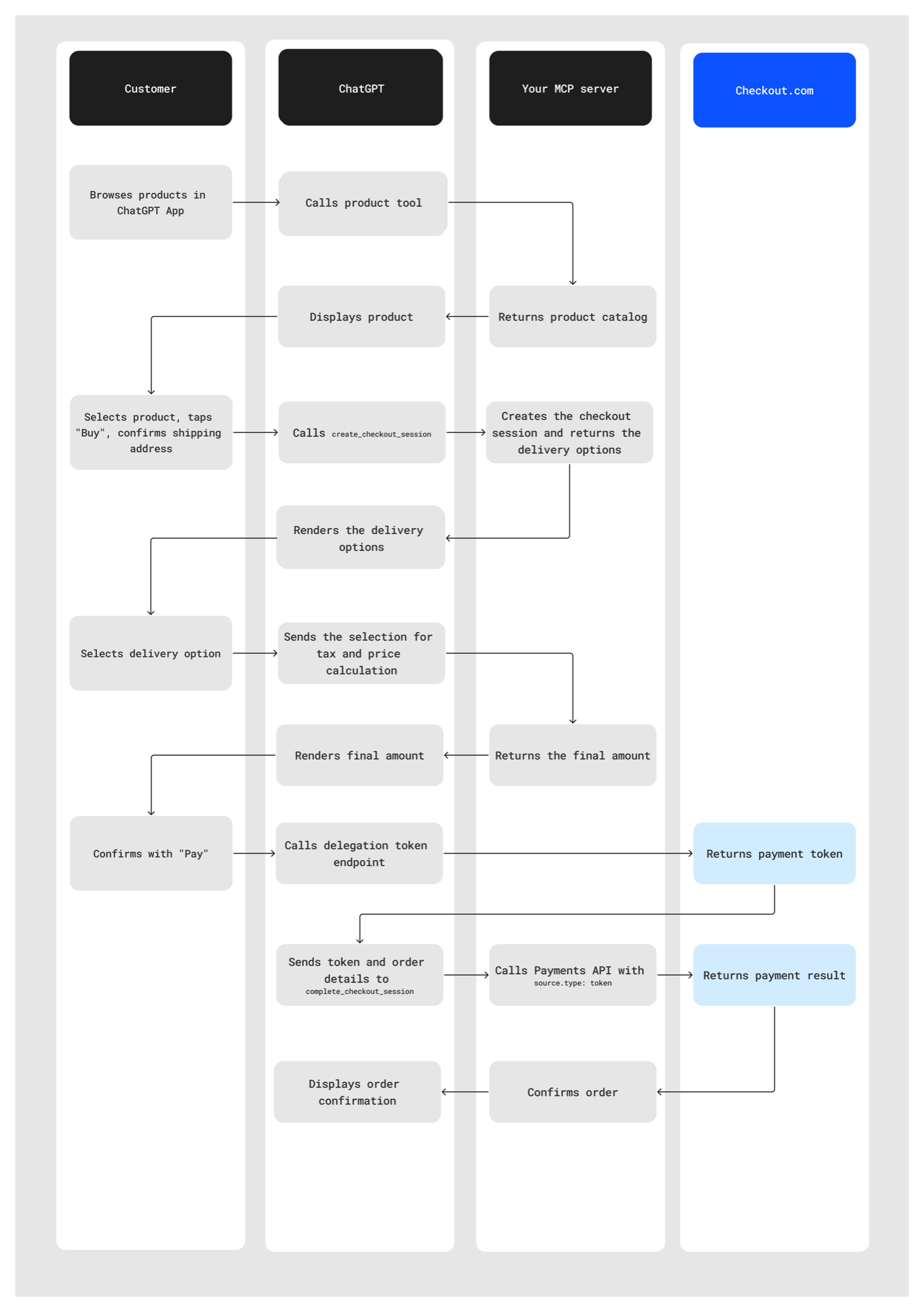
Build a ChatGPT plugin using the OpenAI Apps SDK. A ChatGPT plugin consists of an MCP server that exposes tools to ChatGPT, and an optional UI component rendered in an iframe.
OpenAI's official MCP SDK is the quickest way to get started:
Your MCP server must:
- Advertise tools with JSON schema input and output contracts.
- Include tool annotations for each tool:
- Set
readOnlyHinttotruefor read-only tools such aslist_productsandget_checkout_session. - Set
destructiveHinttotruefor tools with irreversible side effects. - Set
openWorldHinttofalsefor tools that affect only a bounded target.
- Set
- Use Streamable HTTP or Server-Sent Events (SSE) transport.
Ensure your MCP server is reachable over HTTPS. For local development, use a tunneling tool such as ngrok or Cloudflare Tunnel.
- In ChatGPT, go to Settings > Advanced settings, and enable developer mode.
- Go to Connectors > Create, and provide your connector name, description, and the public
/mcpendpoint URL. - Select Create. If the connection is successful, ChatGPT lists the tools your server advertises.
Note
For production plugins, you must submit your plugin to OpenAI for approval before accepting live payments. This is not required for your test plugin.
Information
OpenAI requires ChatGPT plugins to use external checkout, directing customers to complete purchases on your own domain. Instant Checkout within ChatGPT is currently only available to select marketplace partners.
Extend your ChatGPT plugin by implementing the ACP checkout session request types in your MCP server. Checkout.com recommends you implement all request types to handle the full range of customer interactions.
| Request Type | Endpoint | Description |
|---|---|---|
Create a checkout session |
| Initialize a new checkout with items and customer information |
Retrieve a checkout session |
| Get the current state of an existing checkout |
Update a checkout session |
| Modify items, delivery options, or customer details |
Complete a checkout session |
| Finalize the checkout and process payment |
Cancel a checkout session |
| Cancel an active checkout session |
For the full ACP specification, see OpenAI's Agentic Commerce Protocol documentation.
When the customer selects a product, ChatGPT calls your create_checkout_session tool with the selected items:
Create the checkout session in your backend and return the session details to ChatGPT. Include the checkoutRequest object in the structuredContent of your tool response, with your Checkout.com client ID in the payment_provider.merchant_id field:
ChatGPT uses the merchant_id value to call the Checkout.com delegated token endpoint and render the appropriate payment UI.
With the payment token, ChatGPT calls your get_checkout_session tool using the session ID:
Return the current session state from your backend, including item details, status, and totals.
To modify an active checkout, ChatGPT calls your update tool with a POST /checkout_sessions/{id} request. For example, if you need to change the item quantity or the fulfillment address.
Apply the changes in your backend and return the updated session.
When the customer confirms the purchase, ChatGPT collects their card details, calls the Checkout.com delegated token endpoint, and sends the resulting token to your complete_checkout_session tool:
Use the payment_data.token value to call the Checkout.com Payments API with source.type set to "token":
Information
Your base URL's {prefix} value is unique to your account and environment. To learn how to retrieve your base URLs for the sandbox and production environments, see API endpoints.
post
https://{prefix}.api.checkout.com/payments
Return the Checkout.com payment result to ChatGPT through your tool response to confirm the order to the customer.
When the customer cancels a purchase, ChatGPT calls your cancel_checkout_session tool with the session ID and a cancellation reason:
Cancel the session in your backend and return an HTTP 200 response to confirm the cancellation to ChatGPT.
Use the following example prompts to test each ACP request in ChatGPT developer mode. Replace the product name with an item from your catalog.
| Use case | Prompt | Expected behavior |
|---|---|---|
List products | "List all products in the store." | ChatGPT calls your product tool and displays the catalog |
Create a checkout session | "Create a checkout session for 1 | ChatGPT calls your |
Retrieve a checkout session | "Get the details of the checkout session you just created." | ChatGPT calls your |
Complete a checkout | "Complete the checkout session you just created." | ChatGPT collects card details, generates a token, and calls your |
Cancel a checkout | "Please cancel my order." | ChatGPT calls your |
Use test cards to simulate different payment outcomes.