Handle webhooks
Last updated: December 24, 2025
Before you onboard your sub-entities, you must configure your webhook server to receive all necessary notifications throughout the onboarding process.
Subscribe to the following webhooks:
| Webhook | Description |
|---|---|
Occurs when a sub-entity is successfully created. | |
Occurs when a sub-entity passes due diligence Visa Merchant Screening Service (VMSS) checks. | |
Occurs when a sub-entity fails due diligence VMSS checks. | |
Occurs when a sub-entity passes its MATCH check. | |
Occurs when a sub-entity fails its MATCH check. | |
Occurs when the sub-entity passes the CSS checks (VMSS and Match) and its payment capabilities are enabled. | |
Occurs when payment capabilities are disabled for a sub-entity. | |
Occurs when the status of a sub-entity changes. |
The sub-entity status also changes as the process progresses.
Information
For all possible statuses, see Sub-entity status.
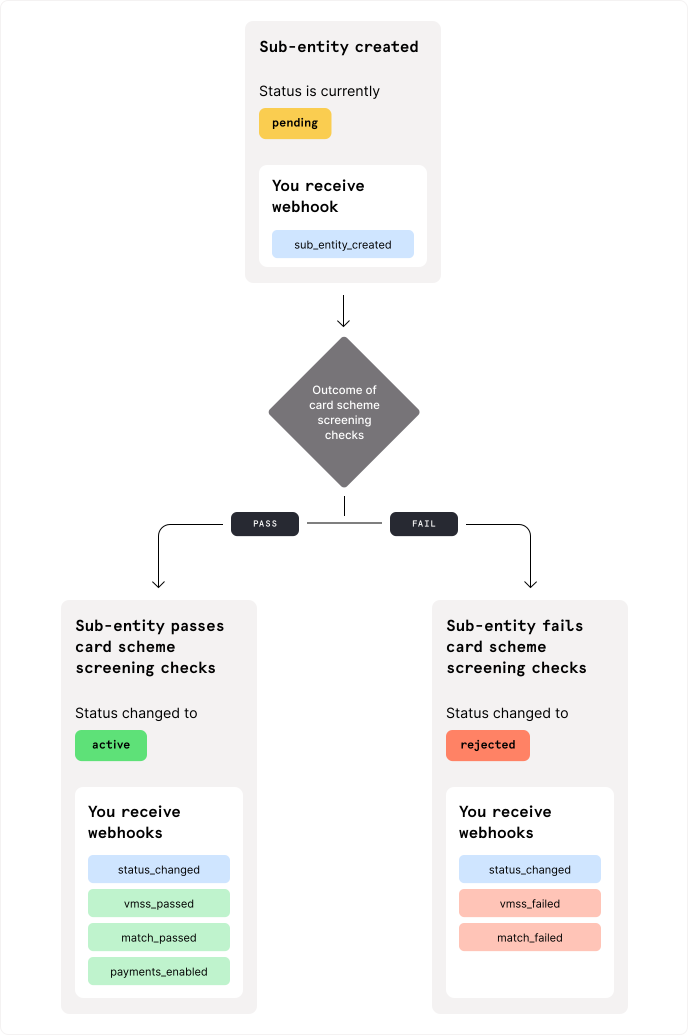
The following graph shows you all the possible status updates as your sub-entity advances in the onboarding process:
Information
If you update an entity's legal_name, trading_name, or profile.urls later, Checkout.com runs the verification checks again.
If any subsequent checks fail, we send the relevant VMSS failed or Match failed webhook, followed by the Payments disabled webhook.
